


Stirling-PDF
★ 97.6kA self-hosted alternative to Adobe Acrobat
About
Community Ratings
New this week
Read recap →
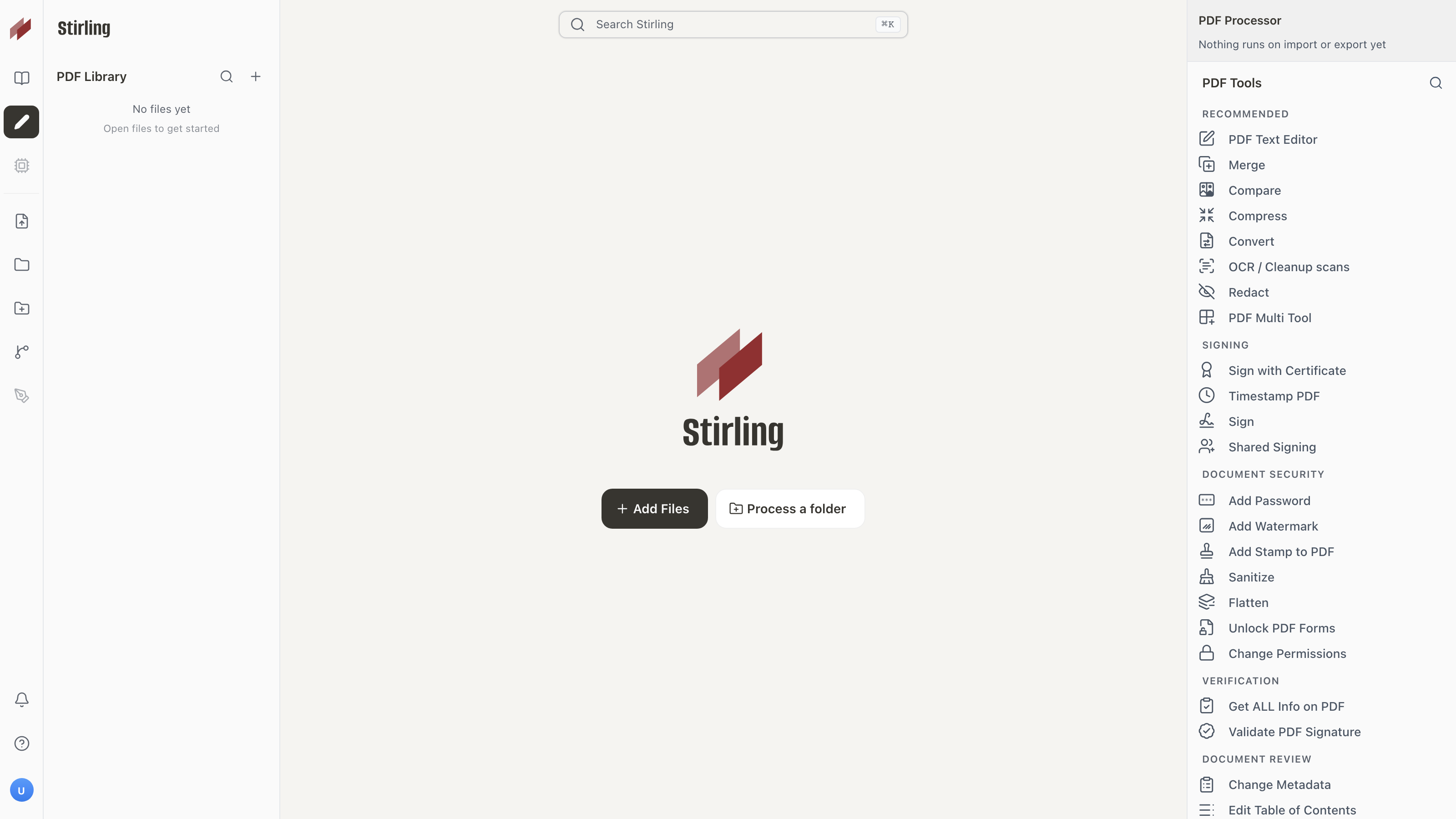
Features
- desktop client
- browser UI
- self-hosted server
- private API
- 50+ PDF tools
- OCR
- no-code workflows
- REST APIs
- 40+ languages
- enterprise-grade SSO and auditing
Details
- Last Updated
- Nov 28, 2026
- Created
- Jan 27, 2023
- Install Methods
- dockerkubernetesbinarysource
- Requirements
- Task
- Default Port
- 8080web UI
- Authentication
- oidc-sso
- API
- REST
- Runtime / Stack
- DockerJava
- Privacy & Independence
- No Cloud RequiredOffline Capable
- User Model
- Multi-User
- Deployment
Deployment: Docker Compose ✓Single Container — minimal hosting footprintsingle container
Run Stirling-PDF yourself
Pick how much you want to manage.
 HostingerSponsored
One click
Hostinger template, runs in your own Hostinger account.
About 5 minutes to running
 CoolifyBest match
One click on your server
Coolify template for your own server.
About 10 minutes if you run Coolify
 netcup
Full control
A small server, then Docker Compose.
About 20 minutes with Docker
7 more ways to host
 HetznerA small server, then Docker Compose.(opens in a new tab)
 DigitalOceanA small server, then Docker Compose.(opens in a new tab)
 OVHcloudA small server, then Docker Compose.(opens in a new tab)
- HostingeraffiliateA small server, then Docker Compose.(opens in a new tab)
 ElestioHosted for you, nothing to maintain.(opens in a new tab)
 UmbrelInstall it from Umbrel on your home server.(opens in a new tab)
 YunoHostInstall it from YunoHost on your home server.(opens in a new tab)
Some links earn us a commission. netcup pays us one and is our preferred VPS host. Hostinger is a paid sponsor and is listed first.
Is this your project? Sponsor a listing
Run Stirling-PDF with Docker Compose
Compose file from the Stirling-PDF project repository.
1 service
no resource limits declared
needs persistent storage (3 volumes)
docker/compose/docker-compose.yml · @ 91782e8 · scanned Nov 3, 2026
services:
  stirling-pdf:
    build:
      context: ../..
      dockerfile: docker/embedded/Dockerfile
    container_name: stirling-pdf
    restart: unless-stopped
    healthcheck:
      test: ["CMD-SHELL", "curl -f http://localhost:8080$${SYSTEM_ROOTURIPATH:-''}/api/v1/info/status | grep -q 'UP'"]
      interval: 5s
      timeout: 10s
      retries: 16
    ports:
      - "8080:8080"
    volumes:
      - ../../stirling/latest/data:/usr/share/tessdata:rw
      - ../../stirling/latest/config:/configs:rw
      - ../../stirling/latest/logs:/logs:rw
    environment:
      DISABLE_ADDITIONAL_FEATURES: "true"
      SECURITY_ENABLELOGIN: "false"
      SYSTEM_DEFAULTLOCALE: en-US
      UI_APPNAME: Stirling-PDF
      UI_HOMEDESCRIPTION: Demo site for Stirling-PDF Latest
      UI_APPNAMENAVBAR: Stirling-PDF Latest
      SYSTEM_MAXFILESIZE: "100"
      METRICS_ENABLED: "true"
      SYSTEM_GOOGLEVISIBILITY: "true"
      SHOW_SURVEY: "true"
    networks:
      - stirling-network

networks:
  stirling-network:
    driver: bridge

volumes:
  stirling-data:
  stirling-config:
  stirling-logs:
This file may be out of date. Check the Stirling-PDF documentation for current setup steps.
Open-source health
FOSS with issues
- vc-funding
- open-core
- sso-tax
- unclear-foss-offering
Source: isitreallyfoss.com · reviewed Jun 2025
Tags
Track your self-hosted stack
Bookmark software to try, rate tools you've used, and keep your collection in one place.
Alternatives to Stirling-PDF

PdfDing

BentoPDF
Bento PDF

OpenSign

Docuseal

Signature PDF

Documenso

SnapOtter

OmniTools

SignuDoc

ConvertX
Related Software

Webarchive

Transmute

Gotenberg

pdf-dark

edentext

I, Librarian
