

Nimbus
★ 137A self-hosted alternative to Datadog
About
Community Ratings
No ratings yetNew this week
Read recap →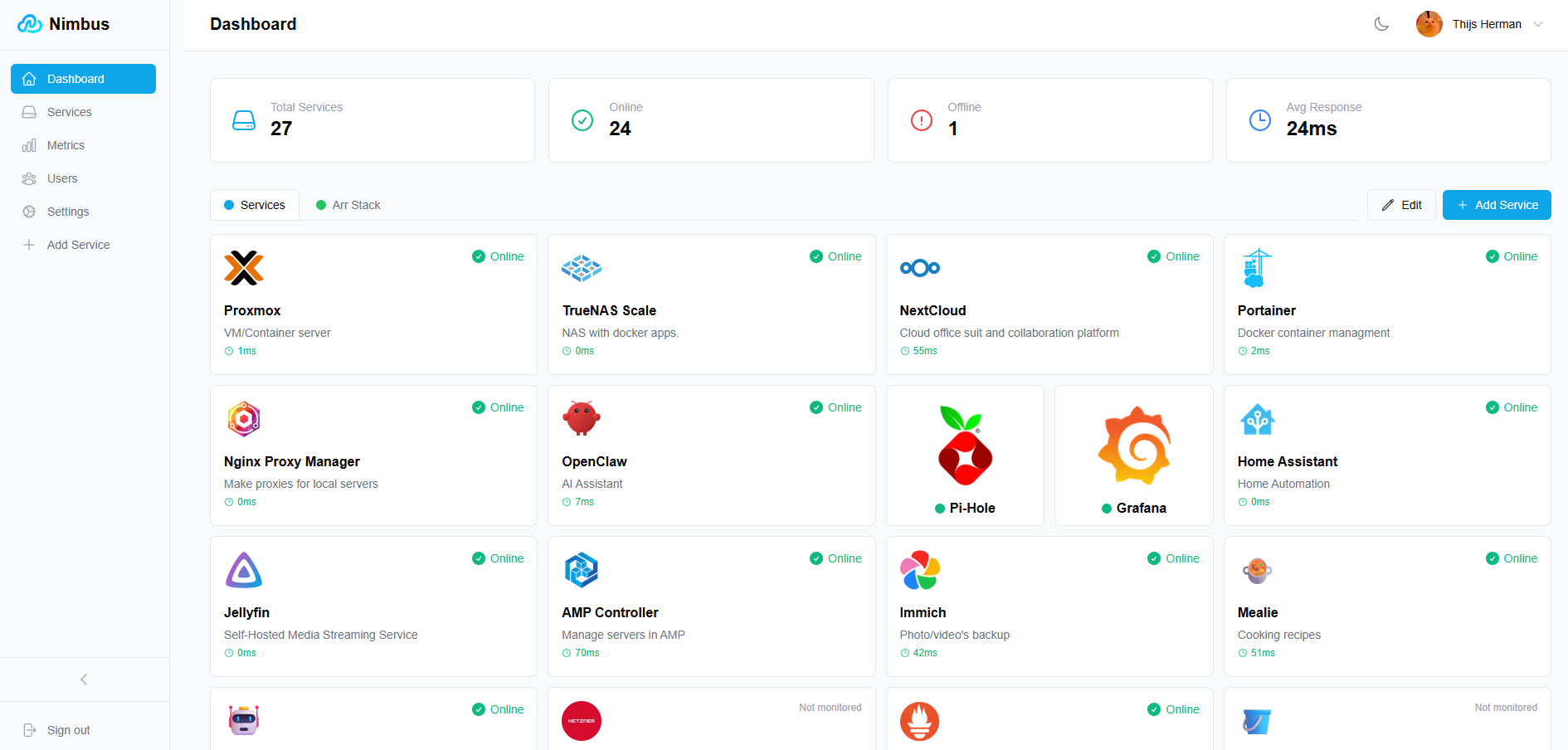
Features
- Real-time service health checks and response-time tracking
- Service status history and uptime graphs
- Local accounts and OAuth2 authentication
- Role-based access control and user administration
- Per-user wallpapers, themes, and dashboard layouts
- Dashboard widgets and service integrations
- Service search and drag-and-drop tiles
- Prometheus metrics export
- Uptime webhook notifications
- Mobile-responsive design
Details
- Last Updated
- Nov 17, 2026
- Created
- Oct 10, 2025
- Install Methods
- docker-composesource
- Requirements
- PostgreSQLNode.js 24+ (local development)Go 1.26+ (local development)
- Default Port
- 3000web UI
- Authentication
- localoauth
- Runtime / Stack
- Docker
- Privacy & Independence
- Cloud: Optional
- User Model
- Multi-User
- Theming
- Dark modeCustom themes
- Deployment
Deployment: Docker Compose ✓2 Containers — light hosting footprintRuns as 2 containers
Run Nimbus yourself
Pick how much you want to manage.
 netcupBest match
Full control
A small server, then Docker Compose.
About 20 minutes with Docker
 Hetzner
Full control
A small server, then Docker Compose.
About 20 minutes with Docker
 DigitalOcean
Full control
A small server, then Docker Compose.
About 20 minutes with Docker
1 more way to host

Some links earn us a commission. netcup pays us one and is our preferred VPS host.
Is this your project? Sponsor a listing
Run Nimbus with Docker Compose
Compose file from the Nimbus project repository.
2 services · 1 unclassified (nimbus-postgres)
no resource limits declared
needs persistent storage (2 volumes)
docker-compose.yml · @ 2302e54 · scanned Nov 3, 2026
# Nimbus Self-Hosted Dashboard - Unified Deployment
#
# Quick Start - No configuration required!
#   docker-compose up -d
#
# That's it! Access Nimbus at http://localhost:3000
#
# Optional: Create a .env file to customize:
#   DB_PASSWORD=your-custom-password    # Default: nimbus-default-password
#   JWT_SECRET=your-custom-secret       # Auto-generated if not set
#
# For advanced users who prefer separate containers, see docker-compose.deprecated.yml

services:
  db:
    image: turboot/nimbus-postgres:18
    container_name: nimbus-db
    restart: unless-stopped
    environment:
      POSTGRES_DB: nimbus
      POSTGRES_USER: nimbus
      POSTGRES_PASSWORD: ${DB_PASSWORD:-nimbus-default-password}
      PGDATA: /var/lib/postgresql/data
    volumes:
      - postgres_data:/var/lib/postgresql/data
    healthcheck:
      test: ["CMD-SHELL", "pg_isready -U nimbus -d nimbus"]
      interval: 10s
      timeout: 5s
      retries: 5
    networks:
      - nimbus-network

  nimbus:
    image: turboot/nimbus:latest
    container_name: nimbus
    restart: unless-stopped
    environment:
      DB_PASSWORD: ${DB_PASSWORD:-nimbus-default-password}
      JWT_SECRET: ${JWT_SECRET:-}
      DB_HOST: db
      # Public URL for password reset emails and OAuth redirects:
      # FRONTEND_URL: ${FRONTEND_URL:-http://localhost:3000}
      # SMTP for password reset emails (or configure via Admin Settings):
      # SMTP_HOST: ${SMTP_HOST:-}
      # SMTP_PORT: ${SMTP_PORT:-}
      # SMTP_USERNAME: ${SMTP_USERNAME:-}
      # SMTP_PASSWORD: ${SMTP_PASSWORD:-}
      # SMTP_FROM_EMAIL: ${SMTP_FROM_EMAIL:-}
      # SMTP_FROM_NAME: ${SMTP_FROM_NAME:-}
      # SMTP_TLS_MODE: ${SMTP_TLS_MODE:-}
      # SMTP_TLS_SKIP_VERIFY: ${SMTP_TLS_SKIP_VERIFY:-}
      # Generic OIDC (Keycloak, Authentik, Dex, etc.):
      # OIDC_ISSUER_URL: ${OIDC_ISSUER_URL:-}
      # OIDC_CLIENT_ID: ${OIDC_CLIENT_ID:-}
      # OIDC_CLIENT_SECRET: ${OIDC_CLIENT_SECRET:-}
      # OIDC_REDIRECT_URL: ${OIDC_REDIRECT_URL:-}
      # Optional overrides:
      # DB_PORT: 5432
      # DB_USER: nimbus
      # DB_NAME: nimbus
    volumes:
      - uploads_data:/app/backend/uploads
    ports:
      - "3000:3000"
    depends_on:
      db:
        condition: service_healthy
    healthcheck:
      test: ["CMD", "wget", "-q", "-O", "/dev/null", "http://localhost:3000/api/v1/health"]
      interval: 30s
      timeout: 10s
      retries: 5
      start_period: 60s
    networks:
      - nimbus-network

volumes:
  postgres_data:
  uploads_data:

networks:
  nimbus-network:
    driver: bridge
This file may be out of date. Check the Nimbus website for current setup steps.
Track your self-hosted stack
Bookmark software to try, rate tools you've used, and keep your collection in one place.
Alternatives to Nimbus

Dashy

Homarr

Homepage by gethomepage

Compass

Homer

Uptime Kuma

Beszel

Kuvasz Uptime

HomeButler

Starbase 80

Heimdall

Gatus
Related Software

Tipi

StatPing.ng

OliveTin

Cronmaster

Mafl

homelab-monitor

Healthchecks

wagmios
