

securo
★ 4.5kA self-hosted alternative to Mint, Ynab
About
Community Ratings
No ratings yetNew this week
Read recap →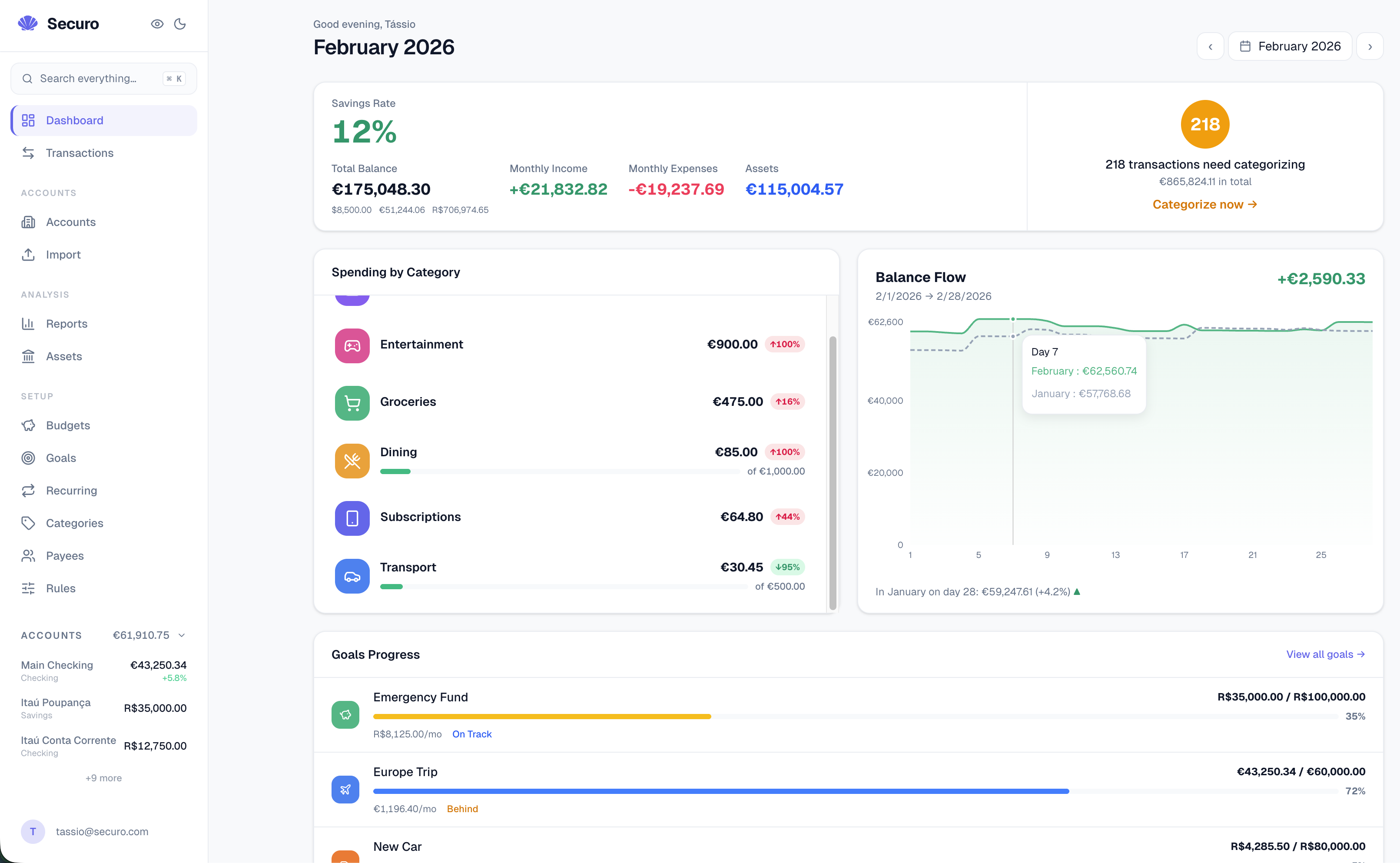
Features
- Multi-account management and running balances
- Transaction management with search, filters, and CSV export
- Import from OFX, QIF, CAMT, and CSV files
- Automatic transaction categorization
- Recurring transactions, budgets, and loan tracking
- Goals and savings targets
- Asset valuation tracking
- Net worth and income-versus-expense reports
- Multi-currency support and automatic exchange-rate conversion
- Multi-user workspaces with roles and admin controls
Details
- Last Updated
- Nov 17, 2026
- Created
- Mar 8, 2026
- Install Methods
- dockerdocker-composebinarysource
- Requirements
- Docker or Podman
- Default Port
- 3000web UI
- Authentication
- oidc-sso2fa
- Backup & Export
- CSV export
- Privacy & Independence
- Cloud: OptionalOffline Capable
- User Model
- Multi-UserMulti-Tenant
- Deployment
Deployment: Docker Compose ✓10 Containers — heavy hosting footprintRuns as 10 containers
Run securo yourself
Pick how much you want to manage.
 netcupBest match
Full control
A small server, then Docker Compose.
About 20 minutes with Docker
 Hetzner
Full control
A small server, then Docker Compose.
About 20 minutes with Docker
 DigitalOcean
Full control
A small server, then Docker Compose.
About 20 minutes with Docker
1 more way to host

Some links earn us a commission. netcup pays us one and is our preferred VPS host.
Is this your project? Sponsor a listing
Run securo with Docker Compose
Compose file from the securo project repository.
10 services · database: pgvector · infra: redis, pgvector
≈2.0 GB RAM requested (from Docker memory limits)
needs persistent storage (2 volumes)
docker-compose.prod.yml · @ 8c867b7 · scanned Nov 17, 2026
name: securo

# podman-compose groups all services into a single pod by default, which
# interferes with per-service port mapping and networking. Disabling it makes
# podman-compose behave like Docker Compose. Docker ignores unknown top-level
# x- keys.
x-podman:
  in_pod: false

x-backend-env: &backend-env
  DATABASE_URL: postgresql+asyncpg://postgres:postgres@db:5432/securo
  SECRET_KEY: ${SECRET_KEY:-dev-secret-change-in-production}
  DEBUG: ${DEBUG:-false}
  FRONTEND_URL: ${FRONTEND_URL:-http://localhost:3000}
  PLUGGY_CLIENT_ID: ${PLUGGY_CLIENT_ID:-}
  PLUGGY_CLIENT_SECRET: ${PLUGGY_CLIENT_SECRET:-}
  PLUGGY_OAUTH_REDIRECT_URI: ${PLUGGY_OAUTH_REDIRECT_URI:-}
  ENABLE_BANKING_APP_ID: ${ENABLE_BANKING_APP_ID:-}
  ENABLE_BANKING_PRIVATE_KEY_FILE: ${ENABLE_BANKING_PRIVATE_KEY_FILE:-/app/secrets/enable_banking_private.pem}
  ENABLE_BANKING_API_URL: ${ENABLE_BANKING_API_URL:-https://api.enablebanking.com}
  ENABLE_BANKING_OAUTH_REDIRECT_URI: ${ENABLE_BANKING_OAUTH_REDIRECT_URI:-}
  SIMPLEFIN_ENABLED: ${SIMPLEFIN_ENABLED:-false}
  SIMPLEFIN_API_URL: ${SIMPLEFIN_API_URL:-https://beta-bridge.simplefin.org}
  OIDC_ENABLED: ${OIDC_ENABLED:-false}
  OIDC_PROVIDER_NAME: ${OIDC_PROVIDER_NAME:-OIDC}
  OIDC_DISCOVERY_URL: ${OIDC_DISCOVERY_URL:-}
  OIDC_CLIENT_ID: ${OIDC_CLIENT_ID:-}
  OIDC_CLIENT_SECRET: ${OIDC_CLIENT_SECRET:-}
  OIDC_REDIRECT_URI: ${OIDC_REDIRECT_URI:-}
  OIDC_SCOPES: ${OIDC_SCOPES:-openid email profile}
  OIDC_AUTO_REGISTER: ${OIDC_AUTO_REGISTER:-true}
  OIDC_EXISTING_USER_LINK_MODE: ${OIDC_EXISTING_USER_LINK_MODE:-disabled}
  OIDC_REQUIRE_VERIFIED_EMAIL: ${OIDC_REQUIRE_VERIFIED_EMAIL:-true}
  OIDC_SYNC_ROLES: ${OIDC_SYNC_ROLES:-false}
  OIDC_ROLES_CLAIM: ${OIDC_ROLES_CLAIM:-groups}
  OIDC_ADMIN_ROLES: ${OIDC_ADMIN_ROLES:-}
  OIDC_WORKSPACE_ROLE_MAP: ${OIDC_WORKSPACE_ROLE_MAP:-}
  LOCAL_AUTH_ENABLED: ${LOCAL_AUTH_ENABLED:-true}
  # No default, so an unset value leaves backend/.env and the app default to decide.
  REGISTRATION_ENABLED:
  OPENEXCHANGERATES_APP_ID: ${OPENEXCHANGERATES_APP_ID:-}
  FX_SYNC_MODE: ${FX_SYNC_MODE:-on_demand}
  TESOURO_DIRETO_ENABLED: ${TESOURO_DIRETO_ENABLED:-true}
  # Data plugins (categories and rules) from the plugin catalog, opt-in.
  # No extra container: the catalog is fetched only when someone opens it.
  PLUGINS_ENABLED: ${PLUGINS_ENABLED:-false}
  PLUGINS_INDEX_URL: ${PLUGINS_INDEX_URL:-https://plugins.usesecuro.com/v1/index.json}
  # Plugins with code run in the plugins-runner container below, started only
  # with `--profile plugins`. Blank PLUGINS_RUNNER_URL: no plugin with code.
  PLUGINS_RUNNER_URL: ${PLUGINS_RUNNER_URL:-}
  PLUGINS_RUNNER_TOKEN: ${PLUGINS_RUNNER_TOKEN:-}
  # The backend is reached through the bundled nginx frontend below, so rate
  # limiting needs to trust exactly one reverse-proxy hop to key by real
  # client IP instead of nginx's own container address.
  TRUSTED_PROXY_HOPS: ${TRUSTED_PROXY_HOPS:-1}
  REDIS_URL: redis://redis:6379/0
  BANK_SYNC_MIN_INTERVAL_HOURS: ${BANK_SYNC_MIN_INTERVAL_HOURS:-4}
  STORAGE_LOCAL_PATH: /app/data/attachments
  AGENTS_KNOWLEDGE_STORAGE_PATH: /app/data/agent_knowledge
  # Agents/LLM feature, opt-in. Off by default so existing users pay
  # zero cost. Run `docker compose -f docker-compose.prod.yml --profile
  # agents up` after enabling.
  AGENTS_ENABLED: ${AGENTS_ENABLED:-false}
  AGENTS_BUILTIN_MCP_URL: ${AGENTS_BUILTIN_MCP_URL:-http://mcp-server:8765/mcp}
  AGENTS_EXTRA_MCP_SERVERS: ${AGENTS_EXTRA_MCP_SERVERS:-}
  AGENTS_MCP_JWT_SECRET: ${AGENTS_MCP_JWT_SECRET:-dev-mcp-secret-change-in-production}
  # TTL for tokens minted from /agents/connections → "External MCP access".
  # Used by Claude Desktop, n8n, custom clients plugging into Securo.
  AGENTS_MCP_EXTERNAL_TTL_DAYS: ${AGENTS_MCP_EXTERNAL_TTL_DAYS:-90}
  # Browser origins the MCP server accepts, comma-separated. Blank admits
  # none; the agent runtime, gateways and desktop clients send no Origin.
  AGENTS_MCP_ALLOWED_ORIGINS: ${AGENTS_MCP_ALLOWED_ORIGINS:-}
  # LLM provider config: only the provider you actually use needs setting.
  AGENTS_DEFAULT_PROVIDER: ${AGENTS_DEFAULT_PROVIDER:-ollama}
  AGENTS_DEFAULT_MODEL: ${AGENTS_DEFAULT_MODEL:-}
  AGENTS_OLLAMA_BASE_URL: ${AGENTS_OLLAMA_BASE_URL:-http://ollama:11434}
  AGENTS_OPENAI_API_KEY: ${AGENTS_OPENAI_API_KEY:-}
  AGENTS_ANTHROPIC_API_KEY: ${AGENTS_ANTHROPIC_API_KEY:-}
  AGENTS_OPENAI_COMPAT_BASE_URL: ${AGENTS_OPENAI_COMPAT_BASE_URL:-}
  AGENTS_OPENAI_COMPAT_API_KEY: ${AGENTS_OPENAI_COMPAT_API_KEY:-}
  # Knowledge-base embeddings. `native` (default) uses fastembed with a
  # bundled multilingual model, so zero external setup. Override with
  # ollama/openai/openai_compatible for better quality.
  AGENTS_EMBEDDING_PROVIDER: ${AGENTS_EMBEDDING_PROVIDER:-native}
  AGENTS_EMBEDDING_MODEL: ${AGENTS_EMBEDDING_MODEL:-sentence-transformers/paraphrase-multilingual-MiniLM-L12-v2}

x-backend-base: &backend-base
  image: ghcr.io/securo-finance/securo-backend:latest
  environment: *backend-env
  # Lets a connection point at a model server running on the host (LM Studio,
  # Ollama, llama.cpp) as http://host.docker.internal:<port>. Docker Desktop
  # resolves the name on its own; this makes it work on Linux too.
  extra_hosts:
    - "host.docker.internal:host-gateway"
  # podman-compose up to 1.6.0 ignores `migrate`'s exit code, so each service
  # also refuses to start until the schema is at head.
  entrypoint: ["sh", "-c", 'alembic current --check-heads && exec "$$@"', "sh"]
  depends_on:
    db: { condition: service_healthy }
    redis: { condition: service_healthy }
    migrate: { condition: service_completed_successfully }
  volumes:
    - ./secrets:/app/secrets:ro
    - attachments:/app/data/attachments
    - agent_knowledge:/app/data/agent_knowledge
    - agent_embedding_models:/app/data/embedding_models
  # `plugins` is internal: it lets the backend reach the plugin runner and
  # nothing else. It costs nothing while the `plugins` profile is off.
  networks: [default, plugins]
  restart: unless-stopped

services:
  redis:
    image: docker.io/library/redis:8-alpine
    restart: unless-stopped
    healthcheck:
      test: [ "CMD", "redis-cli", "ping" ]
      interval: 5s
      timeout: 3s
      retries: 5

  db:
    # docker.io/pgvector/pgvector:pg16 is a drop-in replacement for postgres:16
    # that bundles the pgvector extension, required by the agents
    # knowledge-base (RAG) migration introduced in v0.11.0.
    image: ${DB_IMAGE:-docker.io/pgvector/pgvector:pg16}
    restart: unless-stopped
    environment:
      POSTGRES_USER: postgres
      POSTGRES_PASSWORD: postgres
      POSTGRES_DB: securo
    volumes:
      - pgdata:/var/lib/postgresql/data
    healthcheck:
      test: [ "CMD-SHELL", "pg_isready -U postgres" ]
      interval: 5s
      timeout: 3s
      retries: 5

  # One-shot migration job. Everything that touches the schema waits for it
  # to exit 0, so workers never race `alembic upgrade head`, and a failed
  # migration stops the stack instead of serving a half-migrated database.
  migrate:
    <<: *backend-base
    restart: "no"
    # Replaces the anchor's schema check and migrate gate, which would make
    # migrate wait on itself. YAML merge is shallow, so db/redis are restated.
    entrypoint: ["alembic"]
    command: upgrade head
    depends_on:
      db: { condition: service_healthy }
      redis: { condition: service_healthy }

  backend:
    <<: *backend-base
    healthcheck:
      test: ["CMD", "python", "-c", "import urllib.request; urllib.request.urlopen('http://127.0.0.1:8000/api/health', timeout=5)"]
      interval: 5s
      timeout: 6s
      start_period: 30s
      retries: 12
    command: uvicorn app.main:app --host 0.0.0.0 --port 8000
    ports:
      - "${BACKEND_PORT:-8000}:8000"

  frontend:
    image: ghcr.io/securo-finance/securo-frontend:latest
    ports:
      - "${FRONTEND_PORT:-3000}:8080"
    environment:
      BACKEND_URL: http://backend:8000
      FRONTEND_URL: http://localhost:3000
    depends_on:
      backend: { condition: service_healthy }
    restart: unless-stopped
    labels:
      # Static Traefik routing labels for reverse proxies (e.g. Coolify)
      # whose own "generate FQDN" UI doesn't reliably turn into Traefik
      # labels on this compose file. Opt-in only: set TRAEFIK_ENABLE=true
      # and FRONTEND_DOMAIN (bare domain, no protocol) to use them.
      # TRAEFIK_RESOURCE_NAME must be unique per deployment if multiple
      # Securo instances share the same Traefik/Coolify proxy, otherwise
      # their router/service names collide.
      # TRAEFIK_NETWORK has no default: the Docker network Traefik and this
      # stack share isn't guaranteed to be named `securo_default` (it isn't,
      # under some Coolify setups). Find it with `docker network ls` or
      # `docker inspect <traefik-container> --format '{{json .NetworkSettings.Networks}}'`
      # and set it explicitly. Left unset (the empty value below is
      # equivalent to omitting the label), Traefik auto-detects the network
      # when this container is on exactly one, the default here, since
      # `frontend` isn't attached to any other network out of the box. If
      # you've added `frontend` to additional networks yourself, you MUST
      # set TRAEFIK_NETWORK, or Traefik's choice among them is undefined.
      - traefik.enable=${TRAEFIK_ENABLE:-false}
      - traefik.docker.network=${TRAEFIK_NETWORK:-}
      - traefik.http.routers.${TRAEFIK_RESOURCE_NAME:-securo-frontend}-http.rule=Host(`${FRONTEND_DOMAIN:-localhost}`)
      - traefik.http.routers.${TRAEFIK_RESOURCE_NAME:-securo-frontend}-http.entrypoints=http
      - traefik.http.routers.${TRAEFIK_RESOURCE_NAME:-securo-frontend}-http.middlewares=${TRAEFIK_RESOURCE_NAME:-securo-frontend}-https-redirect
      - traefik.http.routers.${TRAEFIK_RESOURCE_NAME:-securo-frontend}-http.service=${TRAEFIK_RESOURCE_NAME:-securo-frontend}
      - traefik.http.middlewares.${TRAEFIK_RESOURCE_NAME:-securo-frontend}-https-redirect.redirectscheme.scheme=https
      - traefik.http.routers.${TRAEFIK_RESOURCE_NAME:-securo-frontend}-https.rule=Host(`${FRONTEND_DOMAIN:-localhost}`)
      - traefik.http.routers.${TRAEFIK_RESOURCE_NAME:-securo-frontend}-https.entrypoints=https
      - traefik.http.routers.${TRAEFIK_RESOURCE_NAME:-securo-frontend}-https.tls=true
      - traefik.http.routers.${TRAEFIK_RESOURCE_NAME:-securo-frontend}-https.tls.certresolver=${TRAEFIK_CERTRESOLVER:-letsencrypt}
      - traefik.http.routers.${TRAEFIK_RESOURCE_NAME:-securo-frontend}-https.service=${TRAEFIK_RESOURCE_NAME:-securo-frontend}
      - traefik.http.services.${TRAEFIK_RESOURCE_NAME:-securo-frontend}.loadbalancer.server.port=8080

  celery-worker:
    <<: *backend-base
    # Limit to 2 workers to save RAM (default = number of CPUs).
    command: celery -A app.worker worker --loglevel=info --concurrency=2

  celery-beat:
    <<: *backend-base
    command: celery -A app.worker beat --loglevel=info

  # Optional: Securo built-in MCP server. Only starts under the `agents`
  # profile (`docker compose -f docker-compose.prod.yml --profile agents up`).
  # Reuses the backend image, just runs a different uvicorn entry point.
  # Modular by design: users not using the agents feature pay zero cost.
  #
  # The port is published on the host (127.0.0.1 by default) so external
  # agents (Claude Desktop, n8n, custom clients) can reach it after
  # minting a token from the UI. JWT auth is always required. Override
  # AGENTS_MCP_EXTERNAL_HOST_PORT to e.g. "0.0.0.0:8765" to expose to LAN.
  mcp-server:
    <<: *backend-base
    profiles: [agents]
    command: uvicorn mcp_server.main:app --host 0.0.0.0 --port 8765
    ports:
      - "${AGENTS_MCP_EXTERNAL_HOST_PORT:-127.0.0.1:8765}:8765"

  # Optional: plugins with code. Only start under the `plugins` profile
  # (`docker compose -f docker-compose.prod.yml --profile plugins up`, with
  # PLUGINS_ENABLED=true, PLUGINS_RUNNER_URL=http://plugins-runner:8090 and
  # both secrets set). Same image as the backend, but none of its
  # environment: no SECRET_KEY, no database, no provider keys. The runner
  # sits only on the internal `plugins` network, so it can't reach the
  # database, Redis or the internet; each plugin runs as its own user and
  # goes out only through plugins-egress, to the hosts it declared.
  plugins-runner:
    image: ghcr.io/securo-finance/securo-backend:latest
    profiles: [plugins]
    command: uvicorn --factory plugin_runner.main:create_app --host 0.0.0.0 --port 8090
    environment:
      PLUGINS_RUNNER_TOKEN: ${PLUGINS_RUNNER_TOKEN:-}
      PLUGINS_EGRESS_SECRET: ${PLUGINS_EGRESS_SECRET:-}
      PLUGINS_EGRESS_PROXY: plugins-egress:3128
      PYTHONDONTWRITEBYTECODE: "1"
    volumes:
      - plugins:/var/lib/securo-plugins
    networks: [plugins]
    read_only: true
    tmpfs: [/tmp]
    # Root only to hand each plugin its own user and clean up after it.
    cap_drop: [ALL]
    cap_add: [SETUID, SETGID, CHOWN, DAC_OVERRIDE, FOWNER, KILL]
    security_opt: ["no-new-privileges:true"]
    # An init reaps what killed plugin processes leave behind (the runner isn't PID 1).
    init: true
    # Caps for everything plugins start together (each call also has its own limits).
    pids_limit: 512
    mem_limit: ${PLUGINS_RUNNER_MEMORY:-2g}
    restart: unless-stopped

  # The plugins' only way out: a CONNECT proxy that checks each plugin's signed
  # pass against the hosts it declared and refuses private addresses. TLS goes
  # through untouched (client certificates keep working).
  plugins-egress:
    image: ghcr.io/securo-finance/securo-backend:latest
    profiles: [plugins]
    command: python -m plugin_runner.egress
    environment:
      PLUGINS_EGRESS_SECRET: ${PLUGINS_EGRESS_SECRET:-}
      PYTHONDONTWRITEBYTECODE: "1"
    networks: [default, plugins]
    read_only: true
    cap_drop: [ALL]
    security_opt: ["no-new-privileges:true"]
    user: "65534:65534"
    restart: unless-stopped

networks:
  # Declared so podman-compose accepts services that name it alongside `plugins`.
  default: {}
  plugins:
    internal: true

volumes:
  plugins:
  pgdata:
  attachments:
  agent_knowledge:
  agent_embedding_models:
This file may be out of date. Check the securo documentation for current setup steps.
Track your self-hosted stack
Bookmark software to try, rate tools you've used, and keep your collection in one place.
Alternatives to securo

Firefly III

ezbookkeeping

Budget Board

fungible

Expensave

YAFFA

WYGIWYH

MyFin Budget

Kresus

Actual

wealthfolio

Assets
Related Software

Split Pro

Ocular

InvoiceShelf

IHateMoney

Ghostfolio

Fava

Bigcapital
