

odysseus
★ 94.3kA self-hosted alternative to Chatgpt
GNU Affero General Public License v3.0Open Source — No Paywall4 Containers — 4 containers — moderate hosting footprintDocker · Compose · SourceNo external DB0 documented maintainers
About
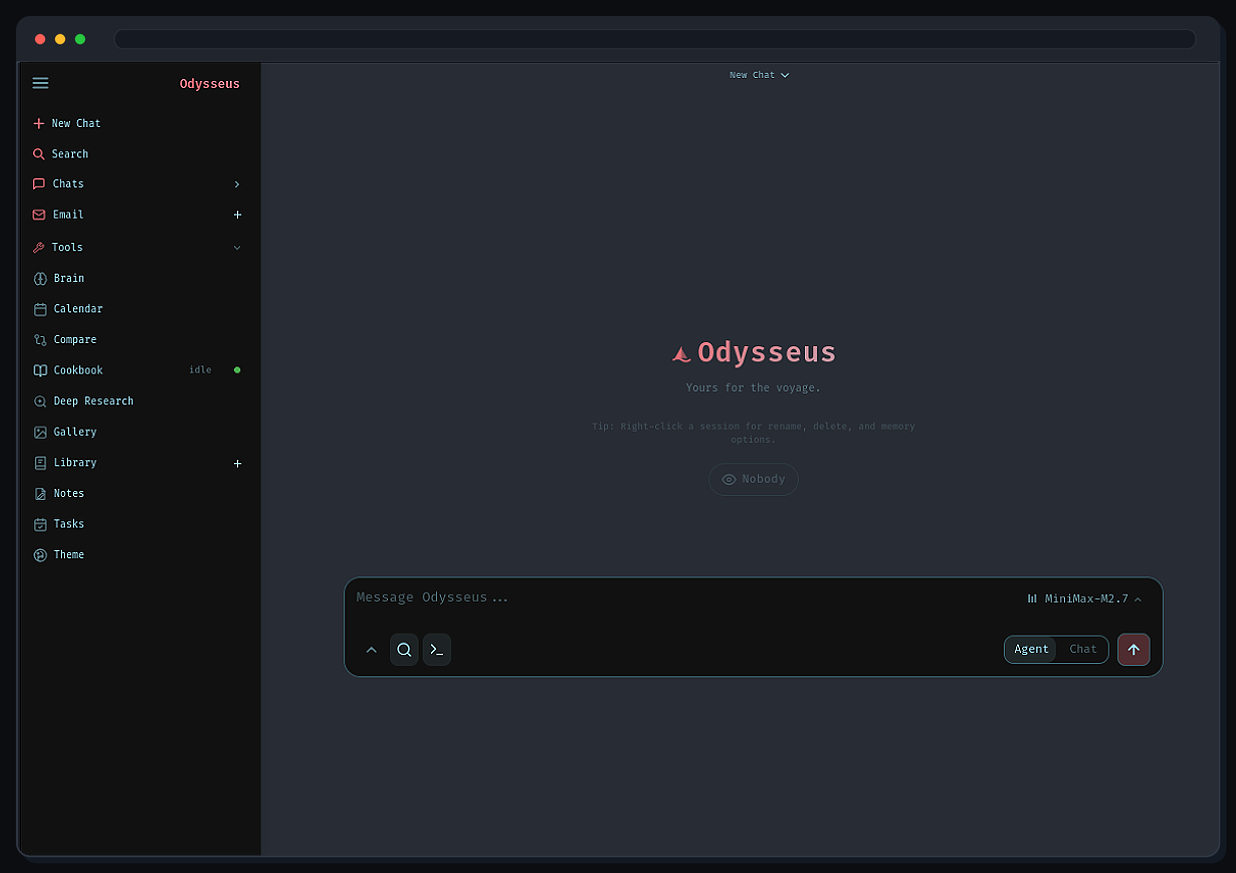
Odysseus is a self-hosted AI workspace designed for people who want a single interface for interacting with models and managing knowledge-work tasks. It combines chat, agent workflows, research...
Community Ratings
No ratings yetNew this week
Read recap →Weekly Recap — Oct 16, 2026 – Oct 23, 2026Oct 23, 2026
Features
- chat and agents
- local/API model support
- tool and MCP integration
- deep research
- model compare
- documents editor
- email inbox and triage
- notes, tasks, and calendar
- CalDAV sync
- 2FA
Details
- Last Updated
- Oct 24, 2026
- Created
- May 31, 2026
- Install Methods
- dockerdocker-composesource
- Requirements
- Dockera local environment configured from .env.example
- Authentication
- local2fa
- Privacy & Independence
- No Cloud RequiredOffline Capable
- User Model
- Multi-User
- Deployment
Deployment: Docker Compose ✓4 Containers — moderate hosting footprintRuns as 4 containers
Run odysseus with Docker Compose
Compose file from the odysseus project repository.
4 services · 3 unclassified (chroma, searxng, ntfy)
no resource limits declared
needs persistent storage (10 volumes)
docker-compose.yml · @ 3b6c169 · scanned Sep 26, 2026
services:
  odysseus:
    build: .
    ports:
      - "${APP_BIND:-127.0.0.1}:${APP_PORT:-7000}:7000"
    volumes:
      - ${APP_DATA_DIR:-./data}:/app/data:z
      - ${APP_LOGS_DIR:-./logs}:/app/logs:z
      # Cookbook remote-server SSH identity. Odysseus can generate a key here;
      # add the shown public key to each remote server's authorized_keys.
      - ${APP_DATA_DIR:-./data}/ssh:/app/.ssh:z
      # Cookbook local model cache. Inside Docker, "Local" means the Odysseus
      # container, so persist its HuggingFace cache under ./data/huggingface.
      - ${APP_DATA_DIR:-./data}/huggingface:/app/.cache/huggingface:z
      # Cookbook-installed Python CLIs/packages (vLLM, llama-cpp-python, etc.)
      # land under /app/.local for the odysseus user. Persist them so a
      # container recreate does not silently remove installed serve engines.
      - ${APP_DATA_DIR:-./data}/local:/app/.local:z
    extra_hosts:
      # Lets the container reach local services on the Docker host, including
      # Ollama at http://host.docker.internal:11434.
      - "host.docker.internal:host-gateway"
    environment:
      - LLM_HOST=${LLM_HOST:-localhost}
      - LLM_HOSTS=${LLM_HOSTS:-}
      - OPENAI_API_KEY=${OPENAI_API_KEY:-}
      - OLLAMA_BASE_URL=${OLLAMA_BASE_URL:-}
      - RESEARCH_LLM_ENDPOINT=${RESEARCH_LLM_ENDPOINT:-}
      - HF_TOKEN=${HF_TOKEN:-}
      - HUGGING_FACE_HUB_TOKEN=${HUGGING_FACE_HUB_TOKEN:-}
      - SEARXNG_INSTANCE=http://searxng:8080
      - CHROMADB_HOST=chromadb
      - CHROMADB_PORT=8000
      - DATABASE_URL=${DATABASE_URL:-sqlite:///./data/app.db}
      - AUTH_ENABLED=${AUTH_ENABLED:-true}
      - LOCALHOST_BYPASS=${LOCALHOST_BYPASS:-false}
      - COMPANION_BASE_URL=${COMPANION_BASE_URL:-}
      - ODYSSEUS_ADMIN_USER=${ODYSSEUS_ADMIN_USER:-admin}
      - ODYSSEUS_ADMIN_PASSWORD=${ODYSSEUS_ADMIN_PASSWORD:-}
      - ALLOWED_ORIGINS=${ALLOWED_ORIGINS:-http://localhost,http://127.0.0.1}
      - SECURE_COOKIES=${SECURE_COOKIES:-}
      - EMBEDDING_URL=${EMBEDDING_URL:-}
      - EMBEDDING_MODEL=${EMBEDDING_MODEL:-}
      - EMBEDDING_API_KEY=${EMBEDDING_API_KEY:-}
      - FASTEMBED_MODEL=${FASTEMBED_MODEL:-sentence-transformers/all-MiniLM-L6-v2}
      - FASTEMBED_CACHE_PATH=${FASTEMBED_CACHE_PATH:-}
      - CLEANUP_INTERVAL_HOURS=${CLEANUP_INTERVAL_HOURS:-24}
      - ODYSSEUS_INPROCESS_POLLERS=${ODYSSEUS_INPROCESS_POLLERS:-1}
      - ODYSSEUS_INPROCESS_TASKS=${ODYSSEUS_INPROCESS_TASKS:-1}
      - ODYSSEUS_SCRIPT_HOST=${ODYSSEUS_SCRIPT_HOST:-localhost}
      - ODYSSEUS_CHAT_UPLOAD_MAX_BYTES=${ODYSSEUS_CHAT_UPLOAD_MAX_BYTES:-10485760}
      - ODYSSEUS_GALLERY_UPLOAD_MAX_BYTES=${ODYSSEUS_GALLERY_UPLOAD_MAX_BYTES:-104857600}
      - ODYSSEUS_GALLERY_TRANSFORM_UPLOAD_MAX_BYTES=${ODYSSEUS_GALLERY_TRANSFORM_UPLOAD_MAX_BYTES:-26214400}
      - ODYSSEUS_MEMORY_IMPORT_MAX_BYTES=${ODYSSEUS_MEMORY_IMPORT_MAX_BYTES:-10485760}
      - ODYSSEUS_PERSONAL_UPLOAD_MAX_BYTES=${ODYSSEUS_PERSONAL_UPLOAD_MAX_BYTES:-26214400}
      - ODYSSEUS_EMAIL_COMPOSE_UPLOAD_MAX_BYTES=${ODYSSEUS_EMAIL_COMPOSE_UPLOAD_MAX_BYTES:-26214400}
      - ODYSSEUS_STT_MAX_AUDIO_BYTES=${ODYSSEUS_STT_MAX_AUDIO_BYTES:-26214400}
      - ODYSSEUS_ICS_MAX_BYTES=${ODYSSEUS_ICS_MAX_BYTES:-10485760}
      - ODYSSEUS_TTS_CACHE_MAX_BYTES=${ODYSSEUS_TTS_CACHE_MAX_BYTES}
      - DATA_BRAVE_API_KEY=${DATA_BRAVE_API_KEY:-}
      - GOOGLE_API_KEY=${GOOGLE_API_KEY:-}
      - GOOGLE_PSE_CX=${GOOGLE_PSE_CX:-}
      - GOOGLE_OAUTH_CLIENT_ID=${GOOGLE_OAUTH_CLIENT_ID:-}
      - GOOGLE_OAUTH_CLIENT_SECRET=${GOOGLE_OAUTH_CLIENT_SECRET:-}
      - GOOGLE_OAUTH_REDIRECT_URI=${GOOGLE_OAUTH_REDIRECT_URI:-}
      # Externally reachable origin for MCP OAuth callbacks. The container
      # always listens on 7000 and cannot see the host port map above, so
      # remote MCP OAuth needs this set whenever the browser reaches
      # Odysseus on anything other than http://localhost:7000.
      - OAUTH_REDIRECT_BASE_URL=${OAUTH_REDIRECT_BASE_URL:-}
      - TAVILY_API_KEY=${TAVILY_API_KEY:-}
      - SERPER_API_KEY=${SERPER_API_KEY:-}
      # PUID / PGID — the user/group the container drops to before
      # running uvicorn (entrypoint also chowns /app/data + /app/logs
      # to match, so bind-mounted files stay editable from the host).
      # 1000 is the default first user on most Linux installs. If your
      # host user has a different id, override here or via .env, e.g.:
      #   PUID=1001
      #   PGID=1001
      # Find yours with:  id -u  /  id -g
      - PUID=${PUID:-1000}
      - PGID=${PGID:-1000}
    depends_on:
      searxng:
        condition: service_healthy
      chromadb:
        condition: service_started
    restart: unless-stopped

  chromadb:
    image: docker.io/chromadb/chroma:latest
    ports:
      - "${CHROMADB_BIND:-127.0.0.1}:8100:8000"
    volumes:
      - chromadb-data:/chroma/chroma
    environment:
      - ANONYMIZED_TELEMETRY=FALSE
    restart: unless-stopped

  searxng:
    # Pinned, not :latest — odysseus waits on searxng's healthcheck
    # (depends_on: condition: service_healthy), so a broken upstream `latest`
    # tag blocks the whole app from starting. 2026.6.2 crashes on boot with
    # `KeyError: 'default_doi_resolver'`, failing the healthcheck (issue #1414).
    # Bump this deliberately after verifying a newer tag boots clean.
    image: docker.io/searxng/searxng:2026.5.31-7159b8aed
    entrypoint:
      - /bin/sh
      - -c
      - |
        set -eu
        if [ ! -s /etc/searxng/settings.yml ] || grep -q 'odysseus-local-searxng-json-2026-05-30\|__SEARXNG_SECRET__' /etc/searxng/settings.yml; then
          secret="$${SEARXNG_SECRET:-}"
          if [ -z "$$secret" ]; then
            secret="$$(python -c 'import secrets; print(secrets.token_urlsafe(48))')"
          fi
          sed "s|__SEARXNG_SECRET__|$$secret|g" /tmp/searxng-settings.yml.template > /etc/searxng/settings.yml
        fi
        # Advisory: a settings file the migration cannot parse or rewrite must
        # not be what stops searxng from booting. It explains itself on stderr
        # and we carry on, letting searxng report anything genuinely wrong.
        /usr/local/searxng/.venv/bin/python /tmp/migrate-searxng-settings.py /etc/searxng/settings.yml || true
        exec /usr/local/searxng/entrypoint.sh
    ports:
      - "127.0.0.1:8080:8080"
    volumes:
      - searxng-data:/etc/searxng
      - ./config/searxng/settings.yml:/tmp/searxng-settings.yml.template:ro,z
      - ./scripts/migrate_searxng_settings.py:/tmp/migrate-searxng-settings.py:ro,z
    environment:
      - SEARXNG_BASE_URL=http://localhost:8080/
      - SEARXNG_SECRET=${SEARXNG_SECRET:-}
    # The official searxng image runs as the non-root `searxng` user, but its
    # entrypoint still needs to chown /etc/searxng on first boot, drop privs via
    # su-exec, and (with our wrapper above) write settings.yml into the named
    # volume. Without these capabilities the wrapper aborts at the redirection
    # with EACCES and the container fails its healthcheck with permission
    # errors during setup. Mirrors the cap set recommended by the upstream
    # searxng-docker compose file. See issue #721.
    cap_drop:
      - ALL
    cap_add:
      - CHOWN
      - SETGID
      - SETUID
      - DAC_OVERRIDE
    healthcheck:
      test: ["CMD-SHELL", "python -c \"import urllib.request; urllib.request.urlopen('http://localhost:8080/', timeout=5).read(1)\""]
      interval: 5s
      timeout: 6s
      retries: 20
      start_period: 10s
    restart: unless-stopped

  ntfy:
    image: docker.io/binwiederhier/ntfy
    command: serve
    ports:
      - "${NTFY_BIND:-127.0.0.1}:8091:80"
    volumes:
      - ntfy-cache:/var/cache/ntfy
    environment:
      - NTFY_BASE_URL=${NTFY_BASE_URL:-http://localhost:8091}
    restart: unless-stopped

volumes:
  searxng-data:
  chromadb-data:
  ntfy-cache:
This file may be out of date. Check the odysseus website for current setup steps.
Tags
Track your self-hosted stack
Bookmark software to try, rate tools you've used, and keep your collection in one place.
Metadata extracted from README on Oct 13, 2026
Related Software

LobeHub
83.5k
LobeHub is a self-hostable platform for organizing, building, and collaborating with AI agents as teammates.
Artificial IntelligenceGenerative AISelf Hosting Solutions+4
10 ContainersCloud Required
Lobe Chat
83.5k
LobeHub is a self-hostable AI agent platform for organizing, creating, and collaborating with multi-agent workflows.
Artificial IntelligenceAI InterfacesSelf Hosting Solutions+3
6 Containers

AnythingLLM
67.5k
An all-in-one AI application for chatting with documents, building AI agents, and running local or cloud LLM workflows.
Artificial IntelligenceAutomation ToolsSelf Hosting Solutions+7
Single Container

LibreChat
46.2k
LibreChat is a self-hosted AI chat platform that unifies major AI providers in a ChatGPT-like interface.
Artificial IntelligenceAI InterfacesPermissive License+4
5 Containers

LibreChat
46.2k
LibreChat is a self-hosted AI chat platform that unifies major AI providers in a ChatGPT-like interface.
Artificial IntelligenceAI InterfacesLocal LLMs+2
6 Containers

Perplexica
37.7k
Vane is a privacy-focused AI answering engine that runs on your own hardware and returns cited answers from web search and local or cloud LLMs.
Artificial IntelligencePermissive LicenseSearch Engines+5
Vane
37.7k
Vane is a privacy-focused AI answering engine that runs on your own hardware and combines web search with local or cloud LLMs to deliver cited answers.
Artificial IntelligencePermissive LicenseGenerative AI+6

Onyx Community Edition
32.9k
Onyx is a self-hostable open source AI chat platform that works with any LLM and supports advanced search, agents, RAG, and connectors.
Generative AIPermissive LicenseArtificial Intelligence+5
Open Core

big-AGI
7.2k
Big-AGI is a multi-model AI workspace for experts, focused on chat, model comparison, and local-first self-hosting.
Artificial IntelligenceAI InterfacesAI Media Generation+2
Open Core

TinyClaw
297
Tiny Claw is a Bun-native autonomous AI companion framework with a plugin architecture, adaptive memory, and a Discord-like web UI.
Artificial IntelligenceClaws & ClankersAI Agents+3

BionicGPT
2.4k
Bionic is an on-premise, ChatGPT-like generative AI platform for running locally or at data-center scale with strict data confidentiality.
Artificial IntelligenceAI InterfacesAI RAG Systems+3
Open Core

Blinko
11.1k
Blinko is an AI-powered card note-taking app for quickly capturing, organizing, and searching personal notes.
Note Taking AppsCopyleft LicenseKnowledge Management+4
Single Container