

Isso
★ 5.3kAbout
Community Ratings
No ratings yetNew this week
Read recap →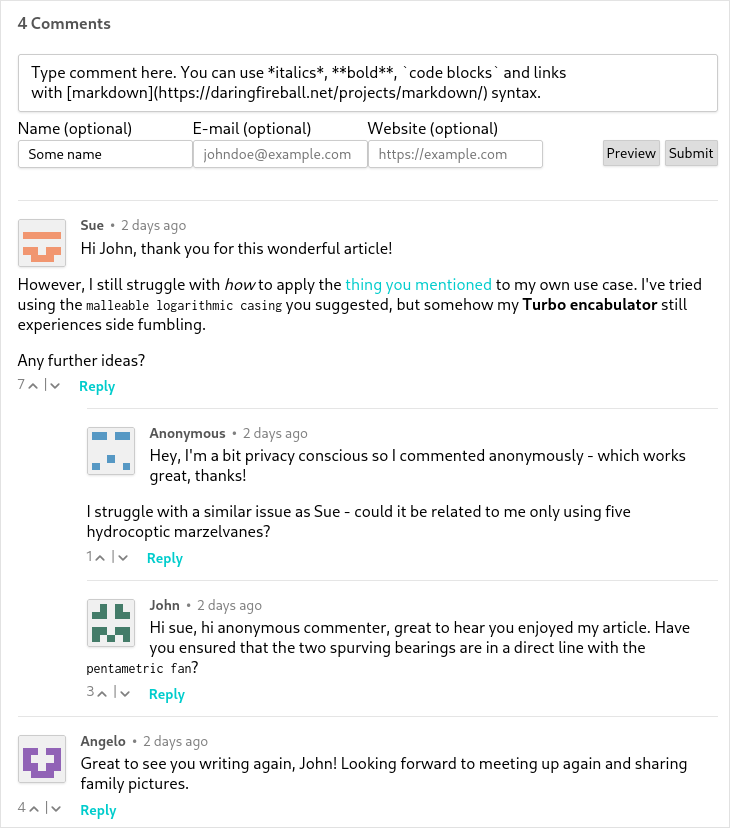
Features
- Markdown comments
- edit/delete own comments
- moderation queue
- SQLite backend
- Disqus import
- WordPress import
- configurable JS client
- live demo
Details
- Last Updated
- Nov 23, 2026
- Created
- Oct 17, 2012
- Install Methods
- package-managerdockersource
- Requirements
- Python 3.8+SQLite 3.3.8 or latera working C compiler
- Default Port
- 8080From the project's Compose file
- Authentication
- local
- Runtime / Stack
- PythonDocker
- Privacy & Independence
- No Cloud RequiredOffline Capable
- User Model
- Multi-User
- Deployment
Deployment: Docker Compose ✓2 Containers — light hosting footprintRuns as 2 containers
Run Isso yourself
Pick how much you want to manage.
 netcupBest match
Full control
A small server, then Docker Compose.
About 20 minutes with Docker
 Hetzner
Full control
A small server, then Docker Compose.
About 20 minutes with Docker
 DigitalOcean
Full control
A small server, then Docker Compose.
About 20 minutes with Docker
2 more ways to host


Some links earn us a commission. netcup pays us one and is our preferred VPS host.
Is this your project? Sponsor a listing
Run Isso with Docker Compose
Compose file from the Isso project repository.
2 services
no resource limits declared
needs persistent storage (5 volumes)
docker-compose.yml · @ 13f7a93 · scanned Nov 3, 2026
# https://docs.docker.com/compose/compose-file/compose-file-v3/
version: "3.9"

services:

  # Isso server should always reflect production image
  isso-server:
    image: isso
    container_name: isso-server
    build:
      context: .
      dockerfile: Dockerfile
    # No need to set entrypoint, image already provides CMD
    #command: /isso/bin/isso -c /config/isso.cfg run
    environment:
      ISSO_SETTINGS: "/config/isso-dev.cfg"
    healthcheck:
      test: wget --no-verbose --tries=1 --spider http://localhost:8080/info || exit 1
      interval: 5s  # short timeout needed during start phase
      retries: 3
      start_period: 5s
      timeout: 3s
    # If needed, production docker image can also be exposed to host for
    # non-docker unit/integration testing
    ports:
      - 127.0.0.1:8080:8080
    # Expose port 80080 to other containerized services, not to host machine:
    expose:
      - 8080
    networks:
      test-net:
        # Also make available under http://isso-dev.local and localhost:
        aliases:
        - isso-dev.local
        - localhost
    volumes:
      - ./db:/db/
      - type: bind
        source: ./contrib/isso-dev.cfg
        target: /config/isso-dev.cfg
        read_only: true

  # Jest and puppeteer end-to-end integration test runner
  isso-client:
    image: isso-js-testbed
    container_name: isso-client
    build:
      context: .
      dockerfile: docker/Dockerfile-js-testbed
    environment:
      ISSO_ENDPOINT: "http://isso-dev.local:8080"
    # Command may also run from outside docker compose, e.g.:
    # $ docker run isso-js-testbed [mount, networks, ...] npm run test-integration
    #command: npm run test-integration
    networks:
      - test-net
    # Bind-mounts, see:
    # https://docs.docker.com/compose/compose-file/compose-file-v3/#long-syntax-3
    volumes:
      - type: bind
        source: ./package.json
        target: /src/package.json
        read_only: true
      - type: bind
        source: ./isso/js/
        target: /src/isso/js/
        read_only: true
      - type: bind
        source: ./isso/js/tests/screenshots/reference/
        target: /src/isso/js/tests/screenshots/reference/
        read_only: false  # needed for generating screenshots during e2e tests
    depends_on:
      - isso-server

networks:
  test-net:
This file may be out of date. Check the Isso documentation for current setup steps.
Tags
Track your self-hosted stack
Bookmark software to try, rate tools you've used, and keep your collection in one place.
Alternatives to Isso

remark42

Commentario

Chirpy

Artalk

Coral

Talkyard
Related Software

Simple-URL-Shortener

Publify

qpixel

Discourse
Akkoma
