


GoModel
★ 1.3kAbout
Community Ratings
No ratings yetNew this week
Read recap →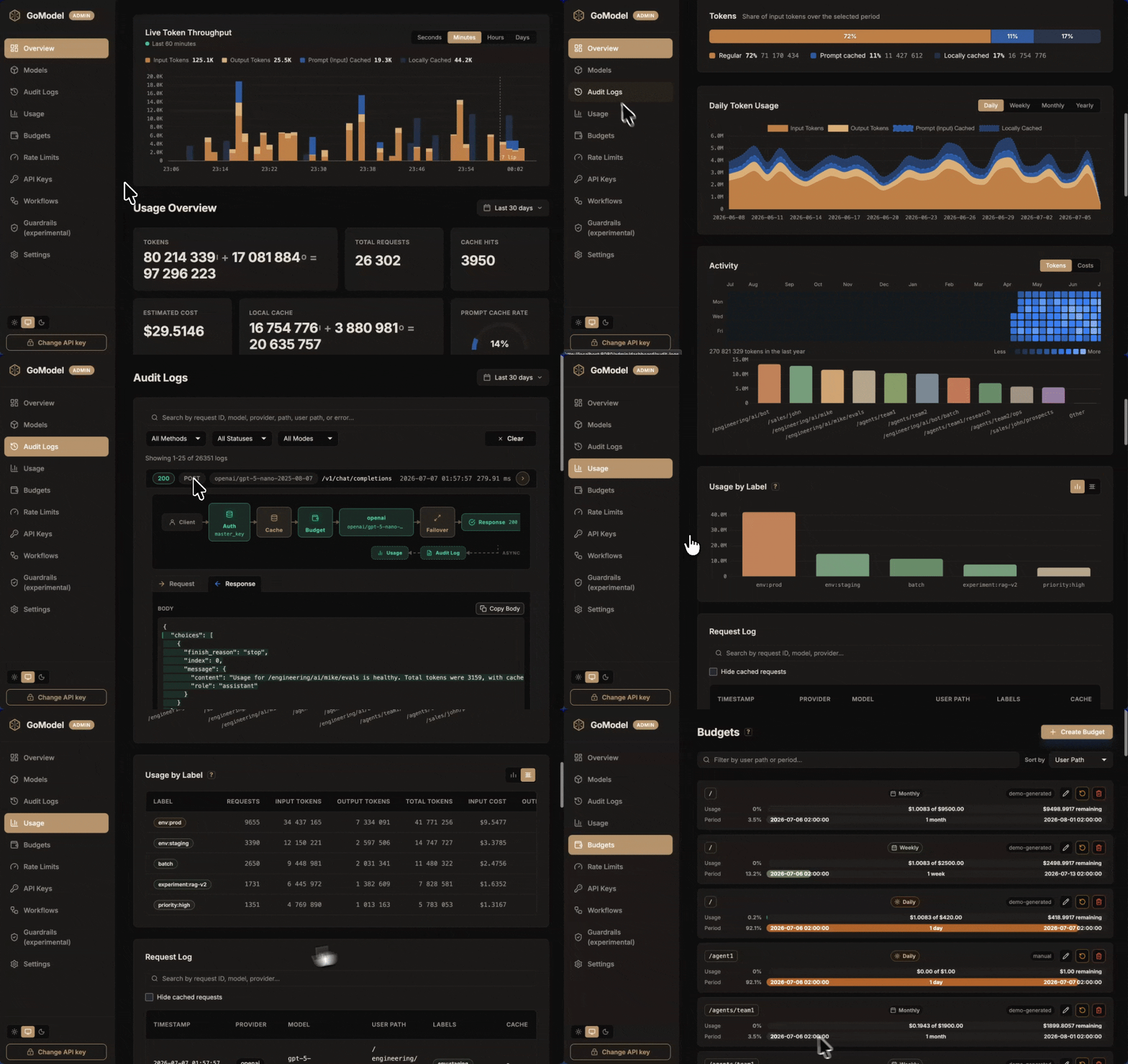
Features
- caching
- cost tracking
- budgets
- rate limits
- usage API
- virtual models
- session keeping
- failover
- model access control
- observability
Details
- Last Updated
- Nov 27, 2026
- Created
- Dec 5, 2025
- Install Methods
- binarydockerdocker-compose
- Requirements
- RedisPostgreSQLMongoDBPrometheus
- Default Port
- 8080web dashboard and API
- API
- REST
- Runtime / Stack
- GoDocker
- Privacy & Independence
- Cloud: Optional
- User Model
- Multi-User
- Deployment
Deployment: Docker Compose ✓6 Containers — moderate hosting footprintRuns as 6 containers
Run GoModel yourself
Pick how much you want to manage.
 HostingerSponsored
Full control
A small server, then Docker Compose.
About 20 minutes with Docker
 netcupBest match
Full control
A small server, then Docker Compose.
About 20 minutes with Docker
 Hetzner
Full control
A small server, then Docker Compose.
About 20 minutes with Docker
2 more ways to host


Some links earn us a commission. netcup pays us one and is our preferred VPS host. Hostinger is a paid sponsor and is listed first.
Is this your project? Sponsor a listing
Run GoModel with Docker Compose
Compose file from the GoModel project repository.
6 services · database: postgres · infra: redis, postgres, mongo · 2 unclassified (adminer, prometheus)
no resource limits declared
needs persistent storage (6 volumes)
docker-compose.yaml · @ 330558a · scanned Nov 3, 2026
# Infra (redis, postgres, mongodb, adminer): `docker compose up -d`
# App + Prometheus: `docker compose --profile app up -d`

services:
  gomodel:
    profiles:
      - app
    build:
      context: .
      dockerfile: Dockerfile
    ports:
      - "${PORT:-8080}:8080"
    env_file:
      - .env
    environment:
      # Cache configuration
      - REDIS_URL=redis://redis:6379
      # Metrics
      - METRICS_ENABLED=true
      # Storage configuration (PostgreSQL for audit logs)
      - POSTGRES_URL=postgres://gomodel:gomodel@postgres:5432/gomodel
      # MongoDB configuration (uncomment to use MongoDB instead)
      - MONGODB_URL=mongodb://mongodb:27017/gomodel
      # Audit logging is enabled by default; pick its storage backend below
      # - STORAGE_TYPE=postgresql
      - STORAGE_TYPE=mongodb
    volumes:
      # The gateway's own state: the SQLite database when STORAGE_TYPE is
      # sqlite, the pid file, and the install identity. Without this the
      # directory is part of the container and is lost when it is recreated.
      - gomodel_data:/app/data
    depends_on:
      redis:
        condition: service_healthy
      postgres:
        condition: service_healthy
      mongodb:
        condition: service_healthy
    restart: unless-stopped

  redis:
    image: redis:7-alpine
    ports:
      - "6379:6379"
    volumes:
      - redis_data:/data
    command: redis-server --appendonly yes
    restart: unless-stopped
    healthcheck:
      test: ["CMD", "redis-cli", "ping"]
      interval: 10s
      timeout: 5s
      retries: 5

  postgres:
    image: postgres:18-alpine
    ports:
      - "5432:5432"
    environment:
      - POSTGRES_USER=gomodel
      - POSTGRES_PASSWORD=gomodel
      - POSTGRES_DB=gomodel
    volumes:
      - postgres_data:/var/lib/postgresql/data
    restart: unless-stopped
    healthcheck:
      test: ["CMD-SHELL", "pg_isready -U gomodel -d gomodel"]
      interval: 10s
      timeout: 5s
      retries: 5
      start_period: 10s

  mongodb:
    image: mongo:8
    ports:
      - "27017:27017"
    volumes:
      - mongodb_data:/data/db
    command: ["--replSet", "rs0", "--bind_ip_all"]
    restart: unless-stopped
    healthcheck:
      test: ["CMD", "mongosh", "--quiet", "--eval", "try { rs.status() } catch(e) { rs.initiate({_id:'rs0',members:[{_id:0,host:'localhost:27017'}]}) }; if (!db.hello().isWritablePrimary) { quit(1) }"]
      interval: 5s
      timeout: 10s
      retries: 10
      start_period: 10s

  adminer:
    image: adminer:5
    ports:
      - "8081:8080"
    depends_on:
      - postgres
    restart: unless-stopped

  prometheus:
    profiles:
      - app
    image: prom/prometheus:latest
    ports:
      - "9090:9090"
    volumes:
      - ./prometheus.yml:/etc/prometheus/prometheus.yml:ro
      - prometheus_data:/prometheus
    command:
      - "--config.file=/etc/prometheus/prometheus.yml"
      - "--storage.tsdb.path=/prometheus"
      - "--web.enable-lifecycle"
    depends_on:
      - gomodel
    restart: unless-stopped

volumes:
  gomodel_data:
  redis_data:
  postgres_data:
  mongodb_data:
  prometheus_data:
This file may be out of date. Check the GoModel documentation for current setup steps.
Tags
Track your self-hosted stack
Bookmark software to try, rate tools you've used, and keep your collection in one place.
Alternatives to GoModel

LiteLLM

Manifest

Kong
Related Software

Ollama

LibreChat

LLMKube

Langfuse

Text Generation Inference

LocalAI

hermes-agent

big-AGI

Codeman

openrig

CloudCLI
