


ByteStash
★ 2.6kAbout
Community Ratings
No ratings yetNew this week
Read recap →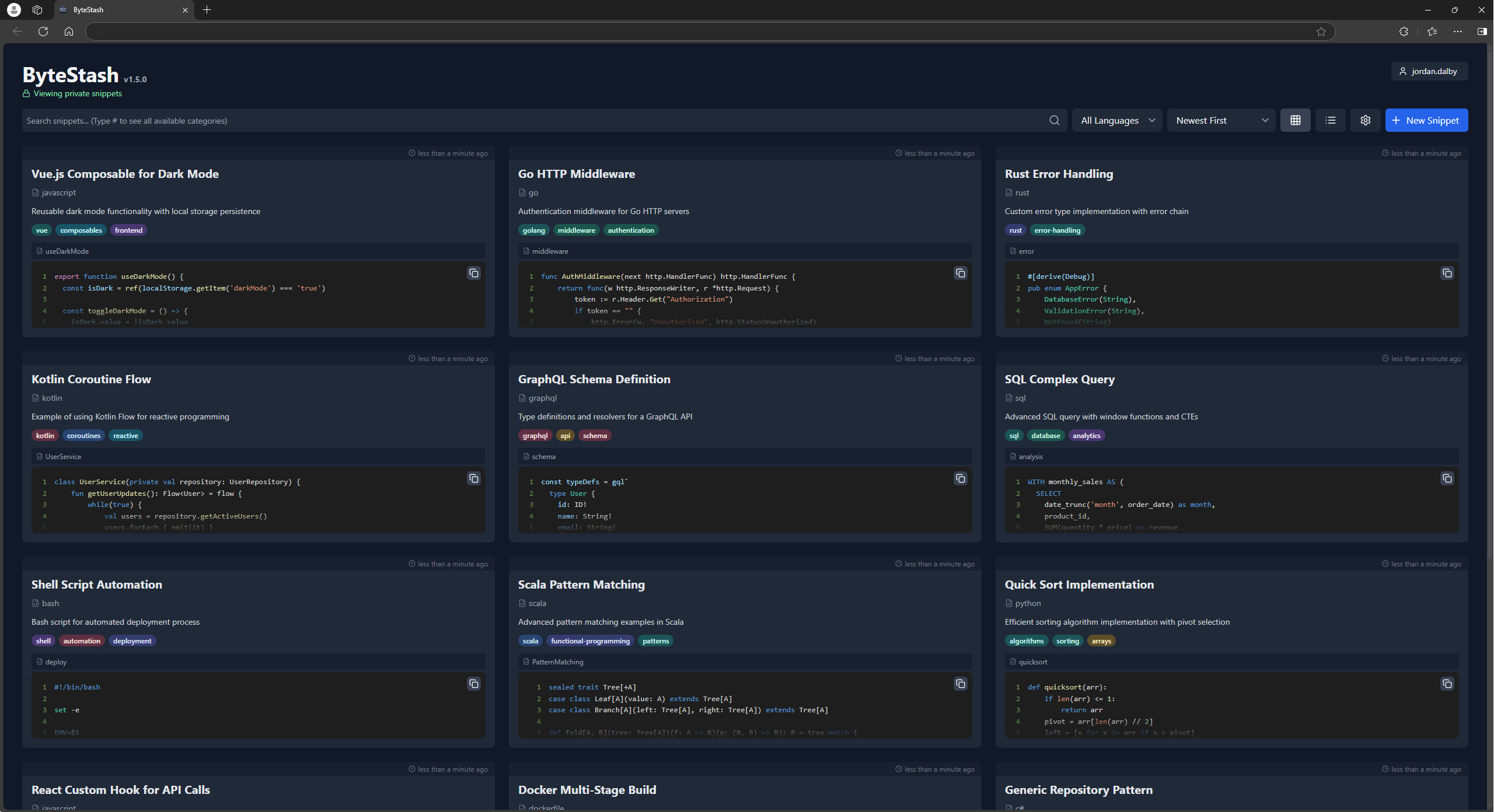
Features
- create snippets
- edit snippets
- filter by language
- filter by content
- secure snippet storage
- MCP endpoint for AI assistants
- API documentation via Swagger UI
Details
- Last Updated
- Nov 28, 2026
- Created
- Oct 16, 2024
- Install Methods
- docker
- Requirements
- sqlite databaseNode.jsExpressReactTailwind CSS
- Default Port
- 5000web UI and API
- Authentication
- oidc-ssolocal
- API
- REST
- Runtime / Stack
- Docker
- Privacy & Independence
- Cloud: OptionalOffline Capable
- User Model
- Multi-User
- Deployment
Deployment: Docker Compose ✓Single Container — minimal hosting footprintsingle container
Run ByteStash yourself
Pick how much you want to manage.
 HostingerSponsored
One click
Hostinger template, runs in your own Hostinger account.
About 5 minutes to running
 netcupBest match
Full control
A small server, then Docker Compose.
About 20 minutes with Docker
 Hetzner
Full control
A small server, then Docker Compose.
About 20 minutes with Docker
4 more ways to host


Some links earn us a commission. netcup pays us one and is our preferred VPS host. Hostinger is a paid sponsor and is listed first.
Is this your project? Sponsor a listing
Run ByteStash with Docker Compose
Compose file from the ByteStash project repository.
1 service
no resource limits declared
needs persistent storage (1 volume)
docker-compose.yaml · @ 0f70994 · scanned Nov 3, 2026
services:
  server:
    build:
      context: .
      dockerfile: Dockerfile
    ports:
      - "5000:5000"
    environment:
      # e.g. write /bytestash for a domain such as my.domain/bytestash, leave blank in every other case
      - BASE_PATH=
      # optionally include additional allowed hosts for reverse proxies
      # e.g. localhost,my.domain.com,my.domain.net
      - ALLOWED_HOSTS=
      # Either provide JWT_SECRET directly or use JWT_SECRET_FILE for Docker secrets
      #- JWT_SECRET_FILE=/run/secrets/jwt
      - JWT_SECRET=your-secret
      # how long the token lasts, examples: "2 days", "10h", "7d", "1m", "60s"
      - TOKEN_EXPIRY=24h
      # is this bytestash instance open to new accounts being created?
      - ALLOW_NEW_ACCOUNTS=true
      # Should debug mode be enabled? Essentially enables logging, in most cases leave this as false
      - DEBUG=false
      # Should we use accounts at all? When enabled, it will be like starting a fresh account so export your snippets, no login required
      - DISABLE_ACCOUNTS=false
      # Should internal accounts be disabled?
      - DISABLE_INTERNAL_ACCOUNTS=false
      # Allow password changes (false by default)
      - ALLOW_PASSWORD_CHANGES=true

      # Optional: Enable OIDC for Single Sign On
      - OIDC_ENABLED=true
      # Optional: Display name for users signing in with SSO, will default to Single Sign-on
      - OIDC_DISPLAY_NAME=
      # Your OIDC issuer url, e.g. https://authentik.mydomain.com/application/o/bytestash/ for authentik
      - OIDC_ISSUER_URL=
      # Your OIDC client ID, you can find it in your app provider
      - OIDC_CLIENT_ID=
      # Your OIDC client secret, again, found in the app provider
      - OIDC_CLIENT_SECRET=
      # The OIDC scopes to request, e.g. "openid profile email groups"
      - OIDC_SCOPES=
      # Optional: Comma-separated list of usernames that should have admin privileges
      # e.g. "admin,jordan" - these users will have access to the admin panel
      - ADMIN_USERNAMES=admin
    volumes:
      - ./data:/data/snippets
# Uncomment to use docker secrets
#    secrets:
#      - jwt

#secrets:
#  jwt:
#    file: ./secrets/jwt.txt
This file may be out of date. Check the ByteStash documentation for current setup steps.
Tags
Track your self-hosted stack
Bookmark software to try, rate tools you've used, and keep your collection in one place.
Alternatives to ByteStash

Snipo

Opengist

Pastefy

Chiyogami

Wastebin

PrivateBin

snowshare

bin

dpaste

pacebin

paaster
Related Software

Aider

machtiani
Wiznote

CloudCLI

Ziit

Outline
